Trace every document to its source.
See the files, versions, and context behind every AI-generated document—without reconstructing the story by hand.
Bring your team’s AI-generated documents into one shared workspace. Firmory automatically records what each file was built from and what it creates next—so everyone can trace, reuse, and build on the work.
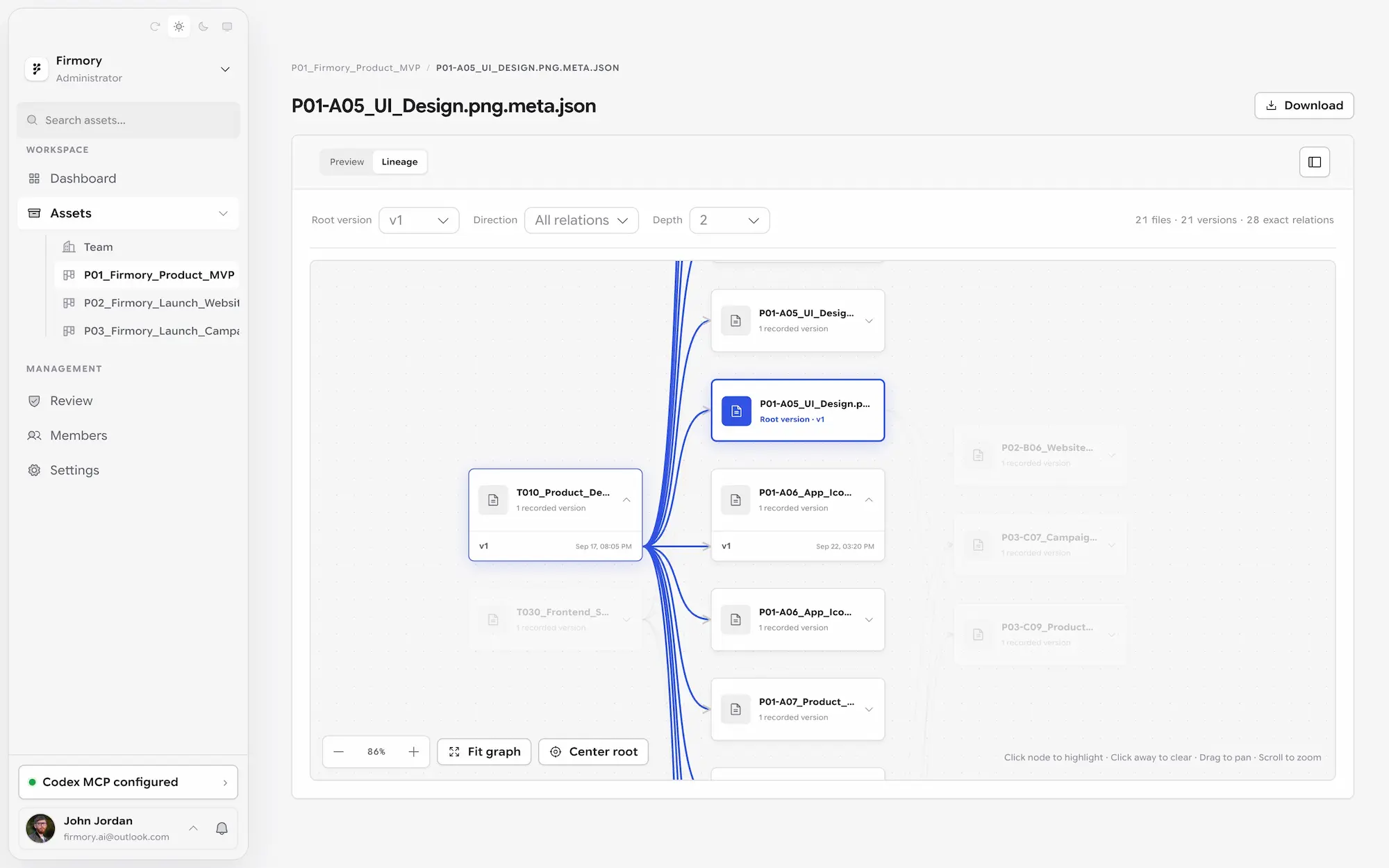
Firmory turns AI-generated documents into connected, reusable team assets—automatically preserving where each one came from, what it powers next, and the shared context around it.
See the files, versions, and context behind every AI-generated document—without reconstructing the story by hand.
Follow downstream reports, plans, and assets built from it, so the impact of good work never disappears.
Keep valuable documents and outputs organized in one shared space, ready to find and use again.
Give the team the latest documents, versions, and connections so people and AI can continue from the same starting point.
Connect a supported AI tool to your Firmory workspace.
Use existing team documents and outputs as context for new AI work.
Firmory records sources, versions, and downstream results automatically, ready for the team to review.
Keep your team’s AI outputs, versions, and connections together, ready to build on.
Teams that use AI agents and build on each other’s work. Project and product managers can follow outputs, versions, and AI activity in one place.
No. Usage and source relationships are recorded automatically when connected AI tools use content through Firmory.
Which files and versions an output relies on, which AI used them and when, and what work builds on them.
Firmory supports Windows and macOS. Installers for other operating systems are not available.
将团队的 AI 文档集中到同一个工作空间。Firmory 自动记录每份文件基于什么生成,又被用于生成什么,让团队无需手动关联,也能追溯、复用并接续已有成果。
Firmory 将 AI 生成的文档变成相互连接、可持续复用的团队资产:自动保留它的来源、后续用途,以及协作所需的完整上下文。
直接查看 AI 文档基于哪些文件、版本和上下文生成,无需事后人工还原过程。
追踪基于这份文档产生的报告、方案和资料,让有价值的成果持续被使用。
把有价值的文档和成果集中在同一个空间,需要时可以快速找到并再次使用。
让团队获得最新文档、版本和关联关系,使人和 AI 都能从同一个起点继续工作。
将支持的 AI 工具连接到 Firmory 工作空间。
将已有文档和成果作为上下文,用于新的 AI 工作。
Firmory 自动记录来源、版本和下游成果,方便团队随时查看。
适合使用 AI Agent、需要接续彼此成果的团队。项目经理和产品经理可以集中查看成果、版本和 AI 的使用记录。
不需要。连接的 AI 工具通过 Firmory 使用内容时,会自动记录调用与来源关系。
成果依赖哪些资料与版本,哪个 AI 在何时使用了它们,以及哪些后续工作建立在这些成果之上。
Firmory 支持 Windows 和 macOS,暂未提供其他操作系统的安装包。